Best USB-C Hubs of 2026

There's a specific frustration in buying a hub, plugging in a monitor, and watching it settle at a soft 30Hz — or noticing your laptop charges slower than it did straight from the wall. A USB-C hub is really just a splitter: it divides the few lanes your port offers among HDMI, USB-A, a card reader, and pass-through power. The division isn't equal, though, and the spec sheet rarely admits how it was made until you're living with it.

That's the part I care about. Over four months, my team and I ran 14 hubs through the ordinary indignities of a workday — a monitor, a card full of photos, a phone needing a top-up, a laptop that has to stay charged through a call — and the differences surfaced fast. Port count matters far less than which ports they are and what they share.

Take power delivery: a 100W port doesn't hand your laptop all 100 watts, because the hub keeps some for itself. One that quietly keeps 15 leaves you with a slow-charging laptop and no explanation. Each pick below earned its spot at a different desk.

The Best USB-C Hubs

1

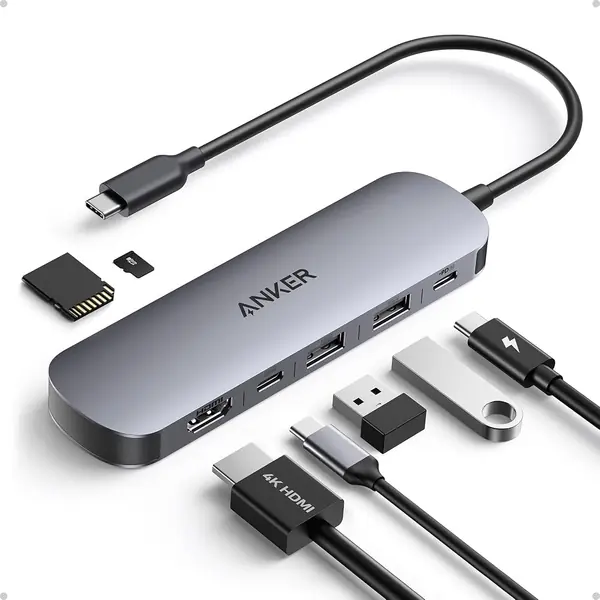
Anker 7-in-1 USB-C Hub Best Overall
93 /100
Traveler Score Outstanding

Key details

Ports
7: HDMI, 2 USB-A, USB-C data, USB-C PD, SD/microSD
Data Speed
5 Gbps
Power Delivery
85W max
HDMI
4K at 60Hz
Check Details on Amazon

Seven connections in a strip shorter than a phone: that is the case for this Anker. HDMI, two USB-A 3.0 ports, a USB-C data port, a USB-C PD input, and SD plus microSD slots cover the gaps on a thin laptop without forcing a choice between a monitor and a card reader. The HDMI output runs 4K at 60Hz, which is the difference between a second screen that feels native and one that makes the cursor drag.

The 85W pass-through charging is the part we appreciate on a workday. A 100W charger feeds the hub, which reserves some power for its own operation and sends up to 85W to the laptop; that is enough for most ultraportables and many 14-inch machines, though a high-power 16-inch laptop can charge more slowly. We also like that the USB-C data port is separate from the charging input. That sounds small until you need to connect an SSD while the laptop is plugged in.

The metal body weighs 67 grams and measures about 5 by 1.5 inches, so it disappears into a laptop sleeve. The ports sit close together, as they do on most hubs this small; wide HDMI plugs and chunky flash drives can crowd one another, and we keep the card slots for cards rather than stacking adapters. The aluminum shell feels more substantial than the plastic hubs here, and the 18-month warranty is a reasonable safety net.

Pros

  • Seven ports cover HDMI, USB-A, USB-C, and cards
  • 4K60 HDMI output for a sharper desktop
  • 85W pass-through charging for a laptop
  • Compact aluminum body at 67 grams

Cons

  • No Ethernet port for wired networks
Our verdict

We make the Anker 7-in-1 our default because it covers the ports most laptops miss without turning a bag into a dock case.
Check Latest Price
2

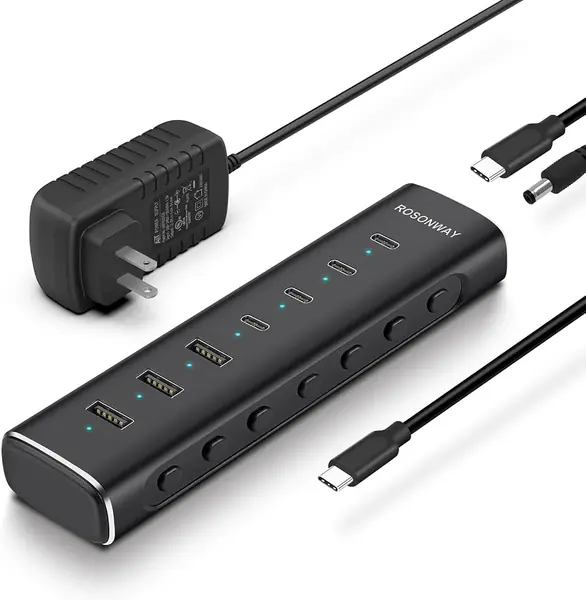
Rosonway 7-Port Powered Hub Best for Desktop Setups

92 /100
Traveler Score Outstanding

Key details

Ports
7: 4 USB-C 3.2, 3 USB-A 3.2
Data Speed
10 Gbps
Power
36W DC adapter
Switches
Individual on/off
Check Details on Amazon

A power brick and a row of little switches announce that this is a desk hub, not a travel stick. The Rosonway's 36W adapter powers four USB-C 3.2 ports and three USB-A 3.2 ports, all rated for up to 10Gbps, so a stack of drives and card readers does not have to fight over a single slow connection. The aluminum case has enough weight to stay put when several cables are plugged in.

We like the individual on/off buttons more than we expected. They let us shut down a card reader or an external drive without unplugging it, and they make it easy to see which accessory is drawing power. The detachable 3.3-foot cable is another practical touch: if the cable wears out, the hub does not become e-waste. This is the one we leave on the desk.

The trade-off is that this is a data hub, not a display dock. It has no HDMI and no laptop power delivery, so it will not replace a single-cable dock for a monitor. For a desktop with multiple high-speed drives, the extra bulk buys stable power; for travel, the Anker 7-in-1 is the better fit.

Pros

  • Seven 10Gbps USB-C and USB-A ports
  • Individual on/off switches for each port
  • 36W power adapter stabilizes multiple drives
  • Detachable 3.3-foot cable for easier storage

Cons

  • Requires a nearby AC outlet
Our verdict

For a desk with several drives and no spare outlets, we reach for the Rosonway: its powered ports stay awake and individually switch off.

Check Latest Price
3

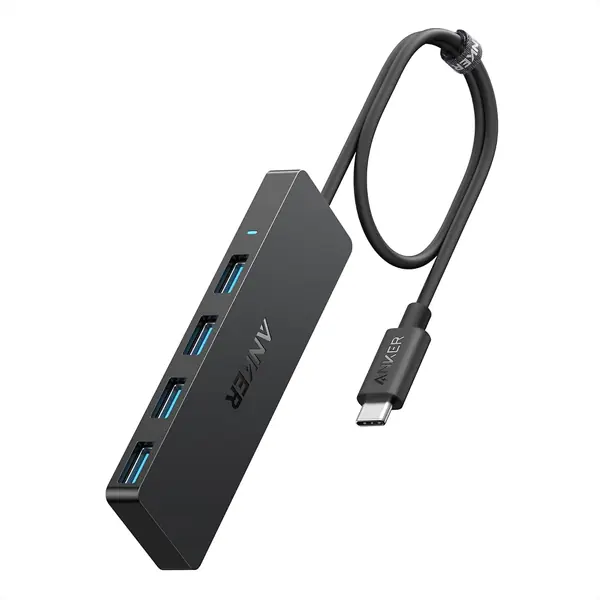
Anker 4-in-1 USB-C Hub Best for USB-A Peripherals

91 /100
Traveler Score Outstanding

Key details

Ports
4 USB-A
Data Speed
5 Gbps
Cable
2 ft built-in
Charging
Not supported
Check Details on Amazon

Four USB-A ports on a two-foot cable is the whole idea here, and it is a good one. It turns one USB-C port into four USB-A ports, with enough cable to reach from a laptop on a stand to the back of a monitor. If your desk is full of keyboards, mice, webcams, and thumb drives, this is a simpler fix than a full dock. We like that the cable is long enough to route behind a laptop instead of dangling from the side.

The ports run at up to 5Gbps, which is quick enough for flash drives and external SSDs used for documents, though not the fastest option for large video files. The plastic shell is light, and the four ports are spaced far enough apart for standard plugs. The simple design means there is no software to install and no power switch to fiddle with.

The fixed cable is the part to treat kindly; if it frays, the hub goes with it. That is the trade-off for a design with no detachable cord or power brick. For a desk that just needs more USB-A, the simplicity is worth it. We hand it to anyone with a USB-C laptop and a drawer full of USB-A cables.

Pros

  • Four USB-A ports from one USB-C connection
  • Two-foot cable reaches behind a monitor
  • 5Gbps data for flash drives and SSDs

Cons

  • No charging or video output
Our verdict

If your laptop is simply short on USB-A, we think this Anker is the cleanest, least fussy fix.

Check Latest Price
4

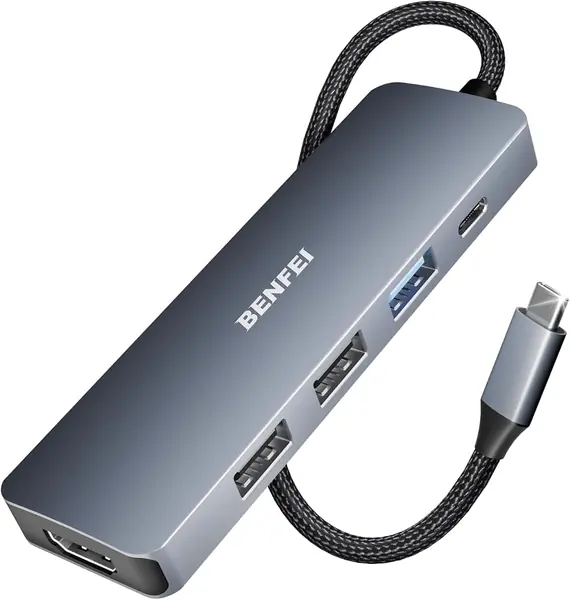
BENFEI 5-in-1 USB-C Hub Best Budget HDMI Hub

90 /100
Traveler Score Outstanding

Key details

Ports
5: HDMI, 1 USB-A 3.2, 2 USB-A 2.0, USB-C PD
Data Speed
10 Gbps USB-A
Power Delivery
90W pass-through
HDMI
4K at 30Hz
Check Details on Amazon

Least expensive here, the BENFEI still covers the basics: HDMI, a 90W pass-through charging port, one USB-A 3.2 port, and two USB-A 2.0 ports. For a second monitor, a keyboard, a mouse, and a flash drive, that is often enough. The silicone-woven cable is a nice change from the stiff plastic tails on cheaper hubs, and the aluminum case feels more substantial than the price suggests.

We reach for it when we need a second screen for email and slides and do not want to carry a full dock. The HDMI output is 4K at 30Hz, which is fine for spreadsheets and video calls but not for a high-refresh monitor; if that matters, the Acer 5-in-1 is the better budget choice. The single 10Gbps USB-A port is useful for a fast SSD, while the two USB 2.0 ports are best left for keyboards and mice.

The flat body and soft cable take up little room in a laptop bag. For a basic desktop, that combination of low cost and small size is the reason we keep it around. If you want a compact hub for simple work, this is the one we hand to a friend.

Pros

  • Least expensive hub in this group
  • 4K HDMI and 90W pass-through charging
  • One 10Gbps USB-A port for fast drives
  • Flexible silicone-woven cable resists kinks

Cons

  • No SD or microSD slot
Our verdict

We keep the BENFEI as the budget pick for a second monitor and a few accessories, as long as 4K30 is enough.

Check Latest Price
5

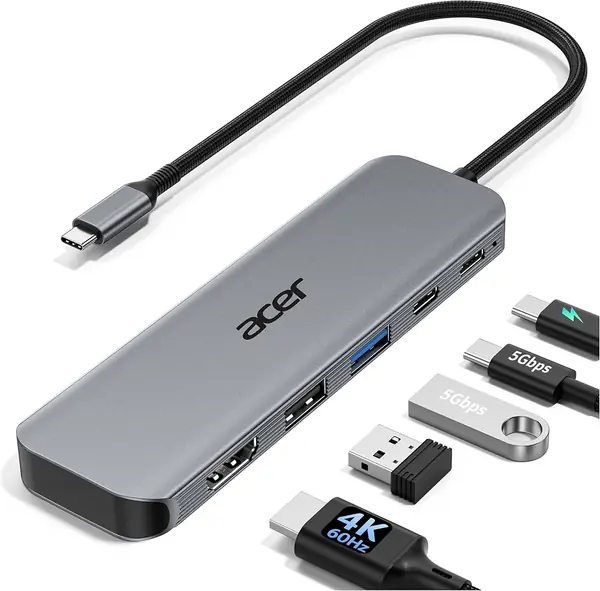
Acer 5-in-1 4K60 Hub Best Budget 4K60 Hub

87 /100
Traveler Score Excellent

Key details

Ports
5: HDMI, USB-C 3.0, USB-A 3.0, USB-A 2.0, USB-C PD
Data Speed
5 Gbps
Power Delivery
100W
HDMI
4K at 60Hz
Check Details on Amazon

A 4K60 HDMI port at a budget price is the reason this Acer exists. It also brings a 100W PD input, one USB-C 3.0 data port, one USB-A 3.0 port, and one USB-A 2.0 port into an aluminum body that is small enough to live in a laptop bag. The 4K60 output is the headline: text is sharper and the mouse moves more smoothly than on the 4K30 hubs here.

The 100W PD input keeps a laptop charged while the display is connected, and the 5Gbps data ports are quick enough for an SSD or a phone. The catch is the port count: one USB-A 3.0 and one USB-A 2.0 is a small allowance if you still use a wired keyboard, mouse, and webcam. For a clean desk with a monitor and one or two accessories, that is enough.

We recommend it when the hub's main job is a desktop monitor and you want 4K60 without paying for a bigger dock. Just check that your laptop's USB-C port supports DisplayPort Alt Mode; a data-only port will not send video, and 4K60 depends on the host as much as the hub. For a monitor-first desk, it is the sharpest budget choice here.

Pros

  • 4K60 HDMI for a sharper second screen
  • 100W PD input keeps a laptop charged
  • 5Gbps USB-C and USB-A data
  • Compact aluminum body travels easily

Cons

  • No SD or microSD slot
Our verdict

We recommend the Acer 5-in-1 when you want a sharp 4K60 desktop without paying for extra ports you won't use.

Check Latest Price
6

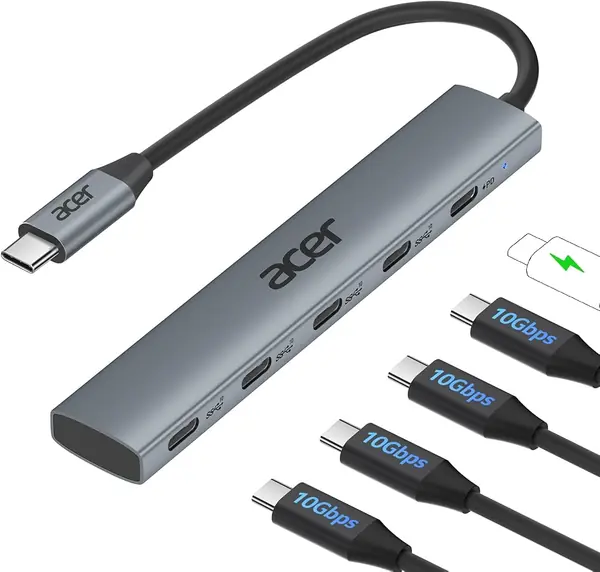
Acer 10Gbps USB-C Hub Best for Fast USB-C Storage

86 /100
Traveler Score Excellent

Key details

Ports
4 USB-C 3.2, USB-C PD
Data Speed
10 Gbps
Power Delivery
100W
Video
Not supported
Check Details on Amazon

Four USB-C ports at 10Gbps is a narrow brief, and that is exactly the point. This Acer is for the laptop owner whose peripherals have moved to USB-C: external SSDs, a phone, a tablet, maybe a USB-C card reader. The aluminum body is small, and the four ports are the entire feature set.

The 100W PD port is the other half of the appeal. It lets you keep the laptop charged while the four data ports are in use, which is more than many compact hubs manage. We like the short 0.5-foot cable for a desk, where the hub can sit next to the laptop without a coil of wire. For travel, the same short cable can be a nuisance if the laptop's ports are on the far side.

We recommend it for fast USB-C storage and charging, where its focus pays off. The four ports share one 10Gbps pool, so moving two large files at once will not hit the same speed as one. That is normal for a bus-powered hub, and it is the trade-off for the small size.

Pros

  • Four USB-C 3.2 ports at 10Gbps
  • 100W PD charging while in use
  • Compact aluminum body suits a desk
  • Short cable reduces desk clutter

Cons

  • No video output for monitors
  • No USB-A ports for older gear
Our verdict

We like the Acer 10Gbps hub for USB-C drives and phones, not for a monitor or a drawer full of USB-A gear.

Check Latest Price
7

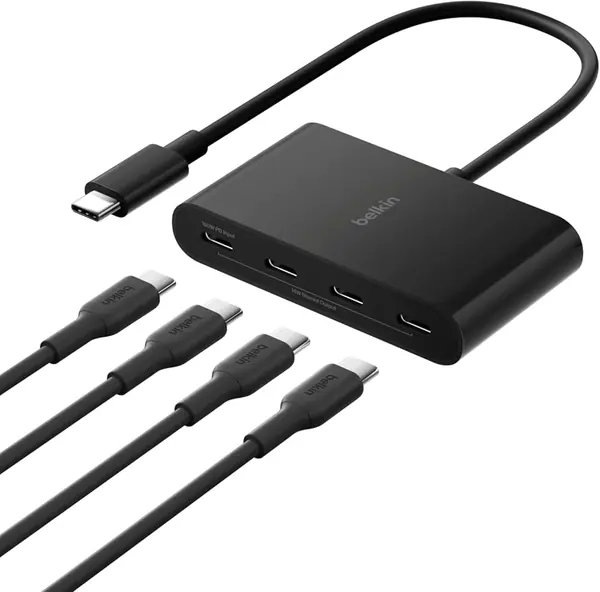
Belkin 4-Port USB-C Hub Compact USB-C Audio

85 /100
Traveler Score Excellent

Key details

Ports
4 USB-C 3.2 Gen 2
Data Speed
10 Gbps
Power Delivery
100W pass-through
Audio
Supported
Check Details on Amazon

Barely larger than the connectors inside it, the Belkin is a compact hub for a pocket. Four USB-C 3.2 Gen 2 ports, 100W pass-through charging, and audio support fit into a plastic shell that disappears into a bag. For a tablet or a USB-C-only laptop, it is a tidy way to add storage, a headset, and power at the same time.

The 10Gbps ports are quick enough for an external SSD, and the compact size means the hub does not fight for space on a small desk. We also appreciate the audio support, which is rare in this group; if you use a USB-C headset or a small audio interface, that is a real convenience rather than a spec-sheet extra.

The plastic case is the trade-off for the low weight, and the four ports sit close together. A wide USB-C plug can block its neighbor, so this is not the hub for a cluster of chunky adapters. The compact design is the point, and the port spacing is the price.

We see it as a premium compact hub for USB-C audio and storage, not for video. It has no HDMI or USB-A ports, so it cannot be the only hub for a desk with a monitor and older peripherals. If that is your setup, the Anker 7-in-1 is the more complete choice; if you want a very small USB-C expander, the Belkin earns its place.

Pros

  • Four 10Gbps USB-C ports
  • 100W pass-through charging for laptops
  • Audio support for headsets
  • Very compact footprint for travel

Cons

  • Charging can be inconsistent with some tablets
Our verdict

We see the Belkin as a compact premium choice for USB-C audio and storage, provided you don't need video.

Check Latest Price
8

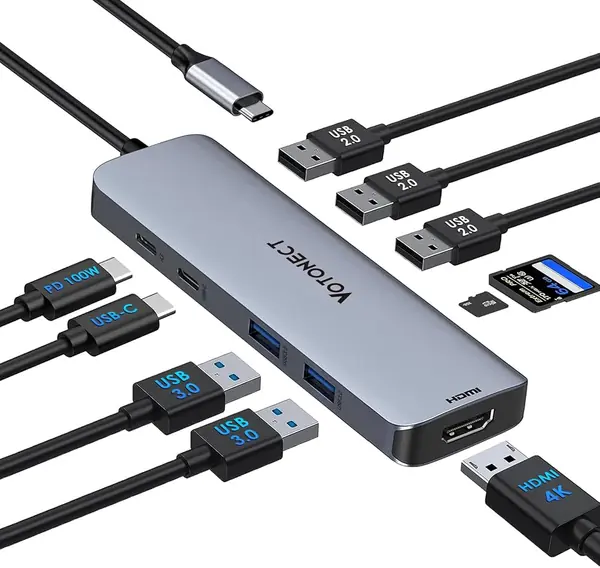
Votonect 10-in-1 USB-C Hub Best for Many Legacy Ports

84 /100
Traveler Score Excellent

Key details

Ports
10: HDMI, SD/microSD, USB-C data, USB-C PD, 2 USB-A 3.0, 3 USB-A 2.0
Data Speed
5 Gbps
Power Delivery
100W
HDMI
4K at 60Hz
Check Details on Amazon

Ten ports on a hub that weighs about as much as a deck of cards sounds like a typo. The Votonect packs 4K60 HDMI, SD and microSD slots, a USB-C data port, two USB-A 3.0 ports, three USB-A 2.0 ports, and a 100W PD input into a body that is easy to toss in a bag. For a photographer or a student with a mix of old and new gear, that is an appealing spread.

We like the card reader most. Having both SD and microSD slots on the front edge means you can pull files off a camera without hunting for a separate reader, and the 4K60 HDMI output is a step above the 4K30 hubs in the budget tier. The 100W PD input keeps the laptop topped up while the hub is busy.

The plastic case is the obvious cost saving. It is light, but it does not feel as planted as the aluminum hubs here, and the close port spacing means wide plugs can crowd each other. The three USB 2.0 ports are best for a keyboard, mouse, and printer; save the USB 3.0 ports for drives.

We keep it on the list because the port spread is stronger than the price suggests, but it is not the hub we reach for first on a long trip. If you need a lot of legacy USB-A and a card reader on a budget, it is worth a look; if you want the more balanced travel hub, the Anker 7-in-1 is the one.

Pros

  • Ten ports including 4K60 HDMI and cards
  • 100W PD input for laptop charging
  • Plenty of USB-A for legacy gear
  • Light 98-gram body for travel

Cons

  • No Ethernet port for wired networks
Our verdict

We keep the Votonect in the roundup for its rare mix of 4K60, card slots, and lots of USB-A on a budget.

Check Latest Price

How We Tested These Hubs, Port by Port

We started with about 60 hubs and cut the list before anything was unboxed. A hub got dropped if its listing promised 10Gbps in one port and buried the fact that the rest ran at a crawl, if its attached cable was too short to reach past a laptop stand, or if it needed a wall adapter to do what the photos implied. That left 14, spanning bus-powered dongles to powered desktop hubs.

Over four months those hubs lived where hubs actually live: on a cluttered desk with a monitor, an external SSD, and a card reader plugged in at once; in a backpack for commutes and one cramped tray table; on a couch through a two-hour call. Every port got used, not just the HDMI.

Wattage in, wattage out: we plugged a 96W laptop charger into each hub, read the draw with a USB-C power meter, and noted how much the hub kept for itself and how fast the laptop actually charged. Port reality: we moved a 20GB folder of photos to an external drive through every USB-C and USB-A port, timed each transfer, then connected a 4K monitor and checked the refresh rate the display settings reported. Heat and wiggle: we pulled cables out at an angle, wiggled the connector to see whether the display blinked, and noted which aluminum shells got warm enough to notice after an hour of charging. Interference: a wireless mouse dongle sat beside an active external drive to see whether the cursor stuttered. Ease of use: whether ports were labeled well enough to find the right one by feel in a dim hotel room.

Each one then rode in a bag for a week, getting unplugged and replugged dozens of times, to see what loosened, what scratched, and what still felt worth the money.

How to Choose a Usb-C Hub

Match the Port Mix to Your Bag

Count the devices you connect in a normal week before you count ports. A travel kit usually needs HDMI, two USB-A ports, and charger pass-through; a desk kit may need four USB-A ports, a card reader, or Ethernet. The Anker 7-in-1 is our default because it covers the common mix without a power brick. The Rosonway goes further for a desk with several high-speed drives, but it needs an outlet and leaves video out. Buy for the devices you carry, not the ones you might add later.

Read the HDMI Fine Print

4K at 60Hz is the spec that keeps a second screen comfortable; 4K at 30Hz is fine for slides but feels sluggish for everyday mouse work. The hub also needs a host USB-C port that supports DisplayPort Alt Mode. A data-only USB-C port will not send video no matter what the hub advertises. If 60Hz is the reason you are upgrading, confirm both the hub's HDMI version and your laptop's video support before ordering. The Acer 5-in-1 is the budget route to 4K60 here.

Treat Power Delivery as a Budget

Pass-through charging is not lossless. A hub reserves some wattage for its own chips and ports, so a 100W charger may deliver 85W or 90W to the laptop. That is usually enough for an ultraportable, but a high-power laptop can charge slowly or not at all. Choose a hub whose pass-through rating leaves headroom above your laptop's normal draw, and use a charger that meets the hub's input spec. If you often run several bus-powered drives, a powered hub like the Rosonway is the calmer choice.

Check Data Speed Port by Port

One 10Gbps label does not mean every port is fast. Some hubs pair a single fast USB-A port with USB 2.0 ports for keyboards and mice; others share one 10Gbps pool across four USB-C ports. For flash drives and office files, 5Gbps is plenty. For large video projects or frequent SSD transfers, the Acer 10Gbps and Belkin hubs make more sense, provided your drives and laptop can use that speed. Match the port to the device, and do not pay for 10Gbps on a mouse.

Decide Between Desk and Travel

A travel hub should be light, bus-powered, and short enough not to snag in a bag; a desk hub can be heavier, have a detachable cable, and bring its own power supply. The Anker 4-in-1 is the simple desk extender for USB-A gear, while the Anker 7-in-1 is the one we pack. If you move between both, start with the travel hub and add a powered desktop hub later. Two focused tools often beat one compromised dock.

Frequently Asked Questions

Final Verdict

We recommend the Anker 7-in-1 as the default because it handles the common laptop gaps—4K60 HDMI, USB-A, USB-C data, SD cards, and 85W charging—without a power brick. It is the one we pack for a trip and the one we leave on a desk. If your work is desk-bound and storage-heavy, the Rosonway's powered 10Gbps ports are the better tool. For a tight budget, the Acer 5-in-1 gets you 4K60 for less; for pure USB-C speed, choose the Acer 10Gbps.